
2023-01-01: This project has been ongoing for a while... now its time to post some of this info and see what comes of it. I have access to several junk Milwaukee M18 batteries. Age varies a little. I thought it would be 'fun' to reverse engineer a battery just to see how it functions... That is until I actually opened the first one up and saw all the 0402 resistors and capacitors. Then it seemed like a 'fun-bad' idea. So here is the start of the first battery; Enjoy! (Reminder - Click on an image to get a larger version!)
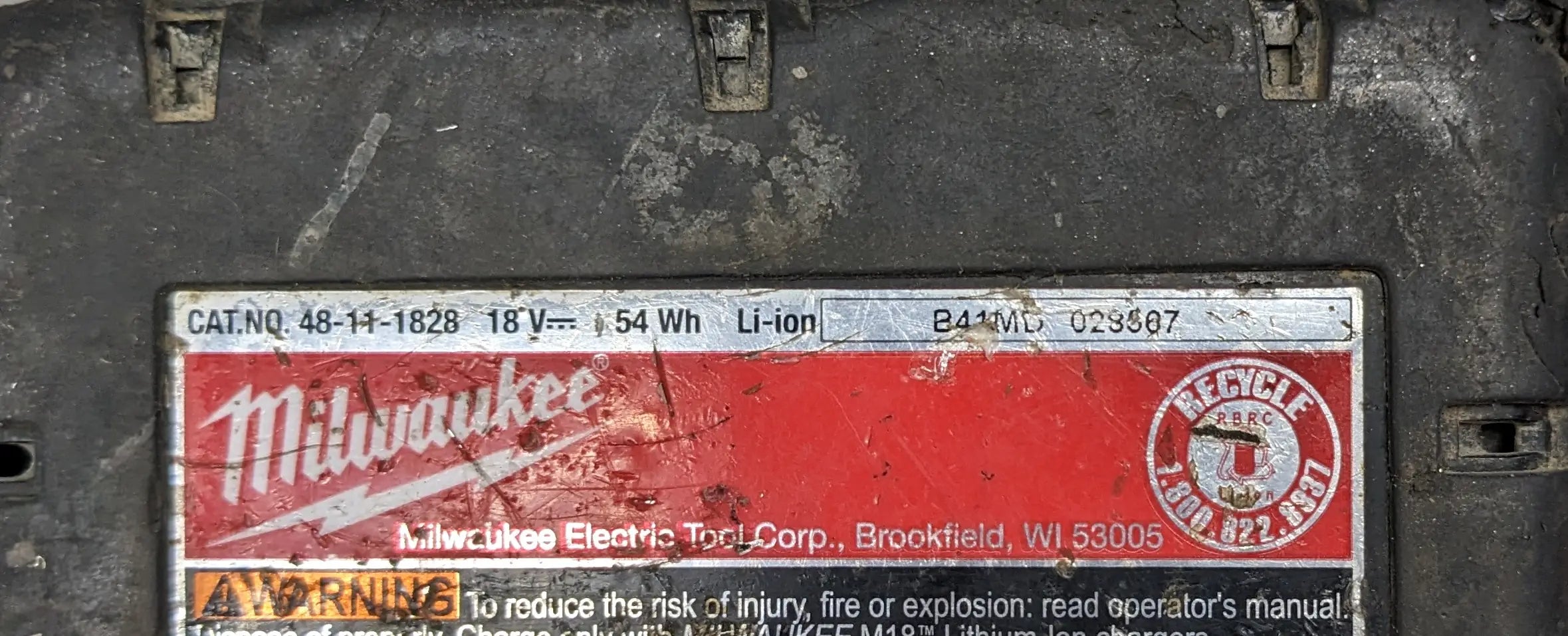
And here is our first candidate for reverse engineering: a Milwaukee M18 48-11-1828 18VDC 54Wh / 3 Ah Battery Pack. (Hey its the first one I picked up... I was aiming for a 5Ah and missed somehow... Didn't actually look very close at what I grabbed until the PCB was already removed.) Serial: B41MD 028567. This particular battery doesn't seem to hold its charge properly (indicator lights go up to full when charging, but put it on a drill and spin it for a second, and the indicator now reads two bars.) Battery voltages appear nominal though. Wasn't really interested in the cells themselves, so left this area of investigation go for the time being.

After removing 4 tamper-proof torx screws and popping the top off the battery top casing off, we're left with a simple circuit board connected to 5 pins and 10 batteries (5 sets of 2 cells). Did I say simple? (I might regret that later...)

I put this PCB under a decent camera (Sony A6300 with the FE 2.8/50 Macro lens) after removing the circuit board and de-soldering the connectors.

And back side of the PCB... Sorry, I really shouldn't have used that 300W Weller soldering iron on these... I don't have the proper tip for the wide terminals on my Hakko... [Another reminder to get this at some point.] I really need to get the coating off these boards.

After a soak in some solvents and a quick scrub with a brass bristled brush, we're left with a nice clear board. We've got two chips that took a bit of time to figure out what they were... [insert plenty of wasted time trying to get pictures of the poorly lasered markings and guessing of multiple digits (is that a B or an 8?; a 6, 5 or an 8?) - My wife finally arrived at the solution for U2 - Hooray for second opinions and excellent reading/deciphering skills!] U1 is a Texas Instruments MSP430G2744 Mixed Signal Microcontroller (Datasheet, PDF, 86 pages, 2.15MB). U2 is a Texas Instruments BQ76925 3 to 6 Series Cell Li-Ion Battery Monitor IC (Datasheet - PDF, 48 Pages, 6.10MB).

Back side of the board... It was at this point that I noticed the tiny little numbers in the upper right hand side of the PCB (the dim 3 and 4). I then had to flip the board over and verify that there was indeed a 1 and 2 on the top side... Uh oh... (This is a 4 layer circuit board) I should also note here the text on the bottom of the board reading "280086026 Rev 7.0 Jan-31-2013"; as far as I can tell that is the same as what the front says.

After a very tedious couple hours of de-soldering components and trying to measure each and every one, we're left with a board that looks like this; It needs some cleanup yet, but that will come shortly... I now have a BOM (PDF, 3 Pages, 29KB) that is surprisingly complete and a board that is still mostly intact - If you want something to look for I lost a total of one pad and loosened two more. The lost pad isn't connected to anything as far as I can tell.
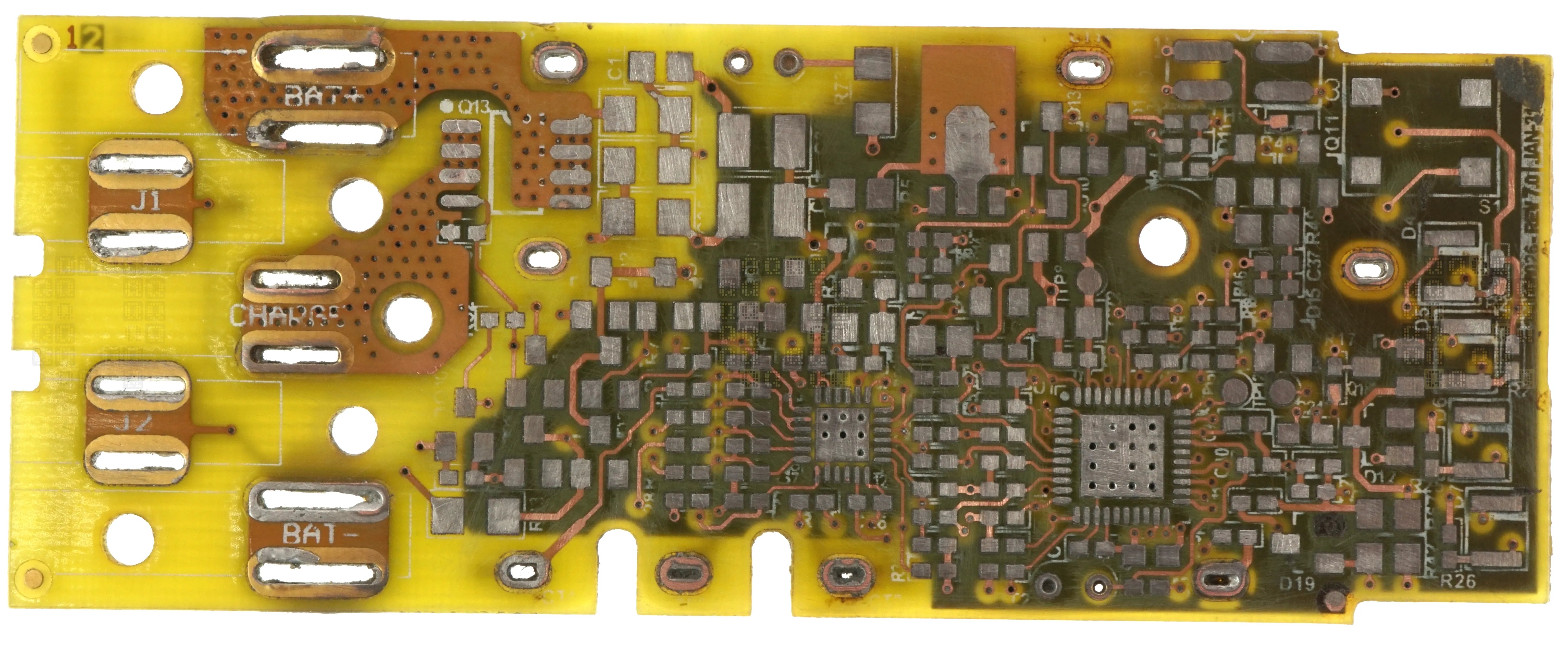
A quick sand with 400 grit sandpaper to take away the solder resist and silkscreen leaves us with most of the copper on Layer 1 visible. Now we need to get to the middle layers.

After a bunch more sanding, we're left with a decently clear view of Layer 2 on the PCB. We can see the ground/negative plane on the right hand side of the board.

Same process on the other side of the PCB. We can see Layer 2 fairly nicely, although I will warn you that some of the vias aren't highlighted very well because of the ground plane on Layer 3... The larger copper area clustered around U1 appears to be the positive rail.
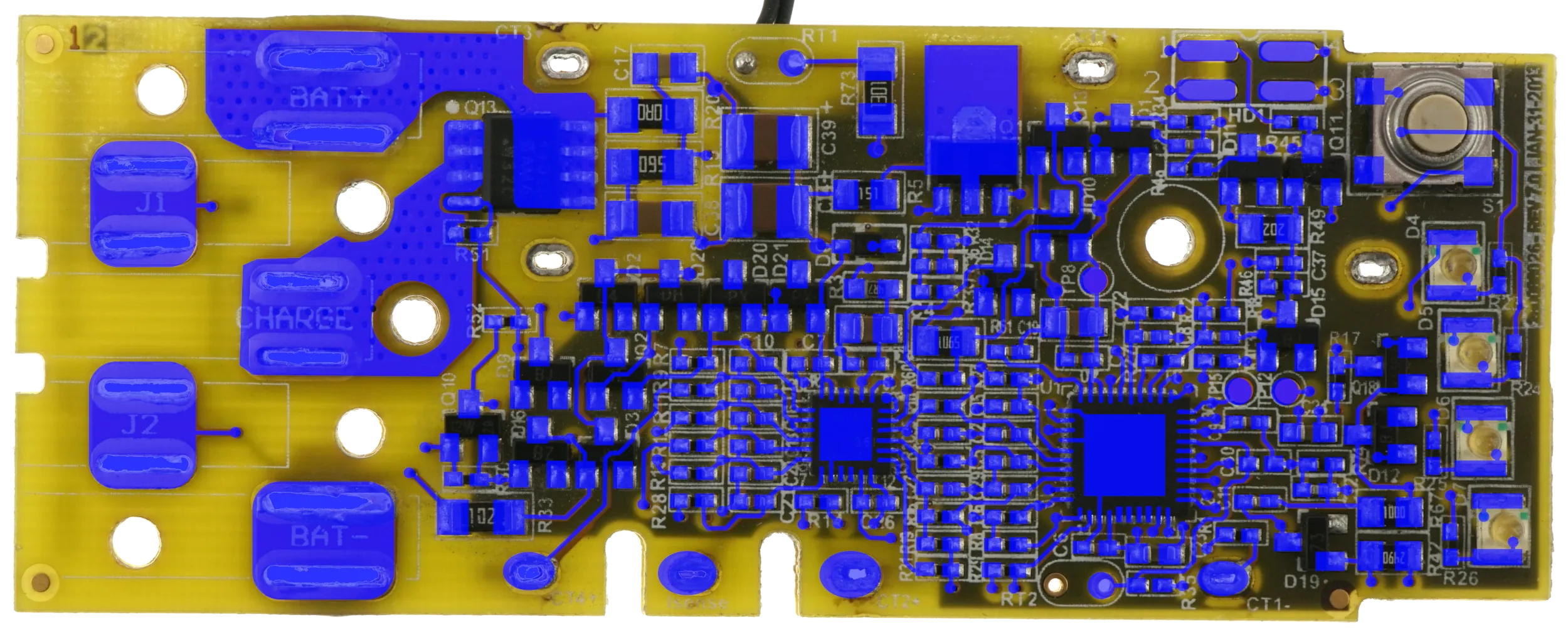
I've gone through and marked all the copper layers to the best of my abilities. I'm going to have to take a bit of a break on this project, but this should be enough info for you to start tracing connections without going to all the previous work. (Let me know if I messed up any of the connections!). And yes, I know I didn't dump firmware either...It is on my todo list! Enjoy!
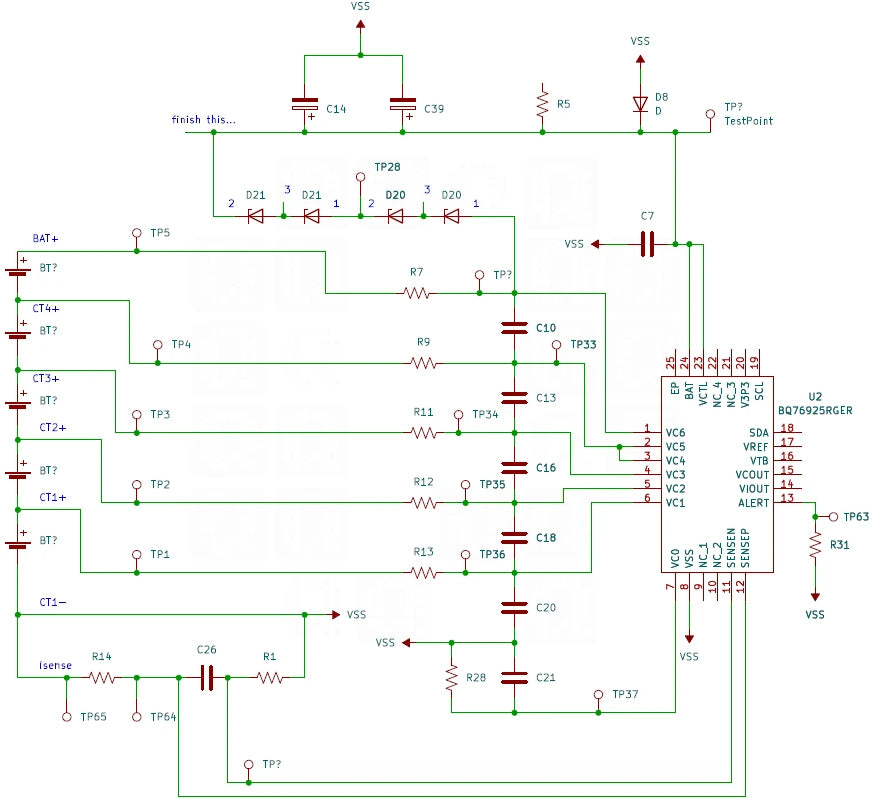
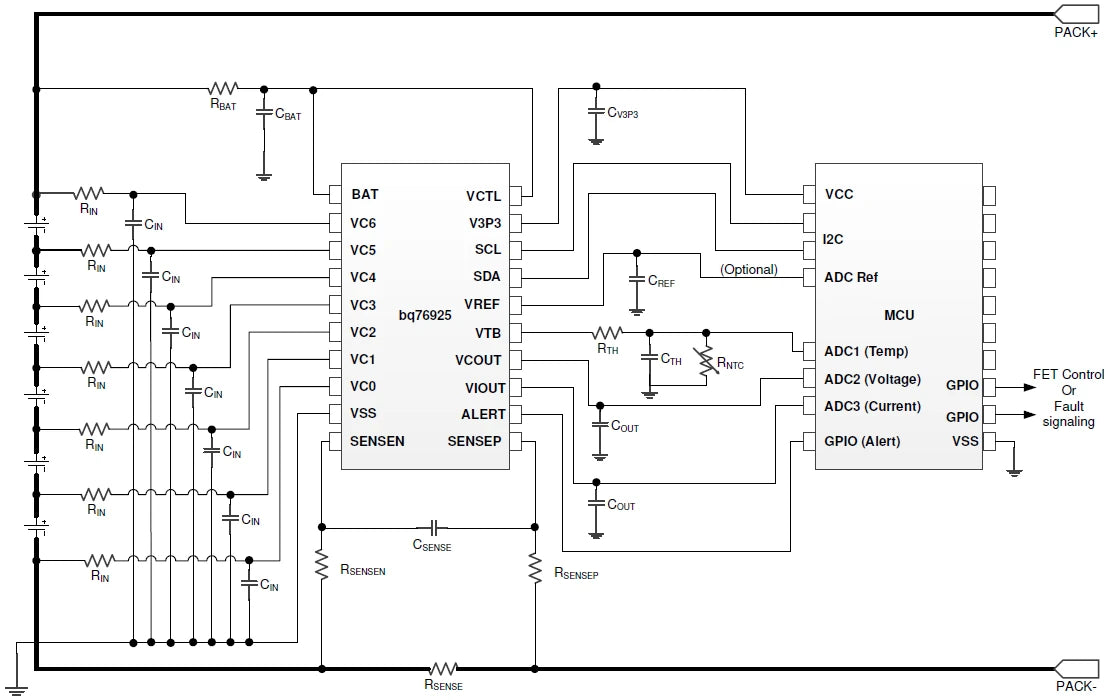
2023-01-16: Small update and work in progress notice: I've attached a small diagram of the BQ76925 Battery Monitoring Connections. This is one area that always puzzled me about these batteries: Was there cell balancing? The answer for this battery is a definite NO! (and this puzzles me...why not? I mean aside from cost?) 2023.2.1 Correction: Thanks to Ben C. for pointing out my mistake; It does appear as if the BQ76925 has the ability to balance cells. Current is controlled by R7/R9/R11/R12/R11. But the actual balancing is controlled by commands from the host MSP430. Every battery connection except BAT+ and CT1- are fully diagramed in this image. I am really confused about the purpose of D20/D21 though... [2023.2.1 note: I think I stumbled onto part of the voltage regulation circuit for the microprocessor. Not diagramed fully though. I really should have included the block diagram from the BQ76925. I'm including it here for reference.] I'm still confused by the difference in capacitor layout between the two diagrams and the actual Milwaukee design though.

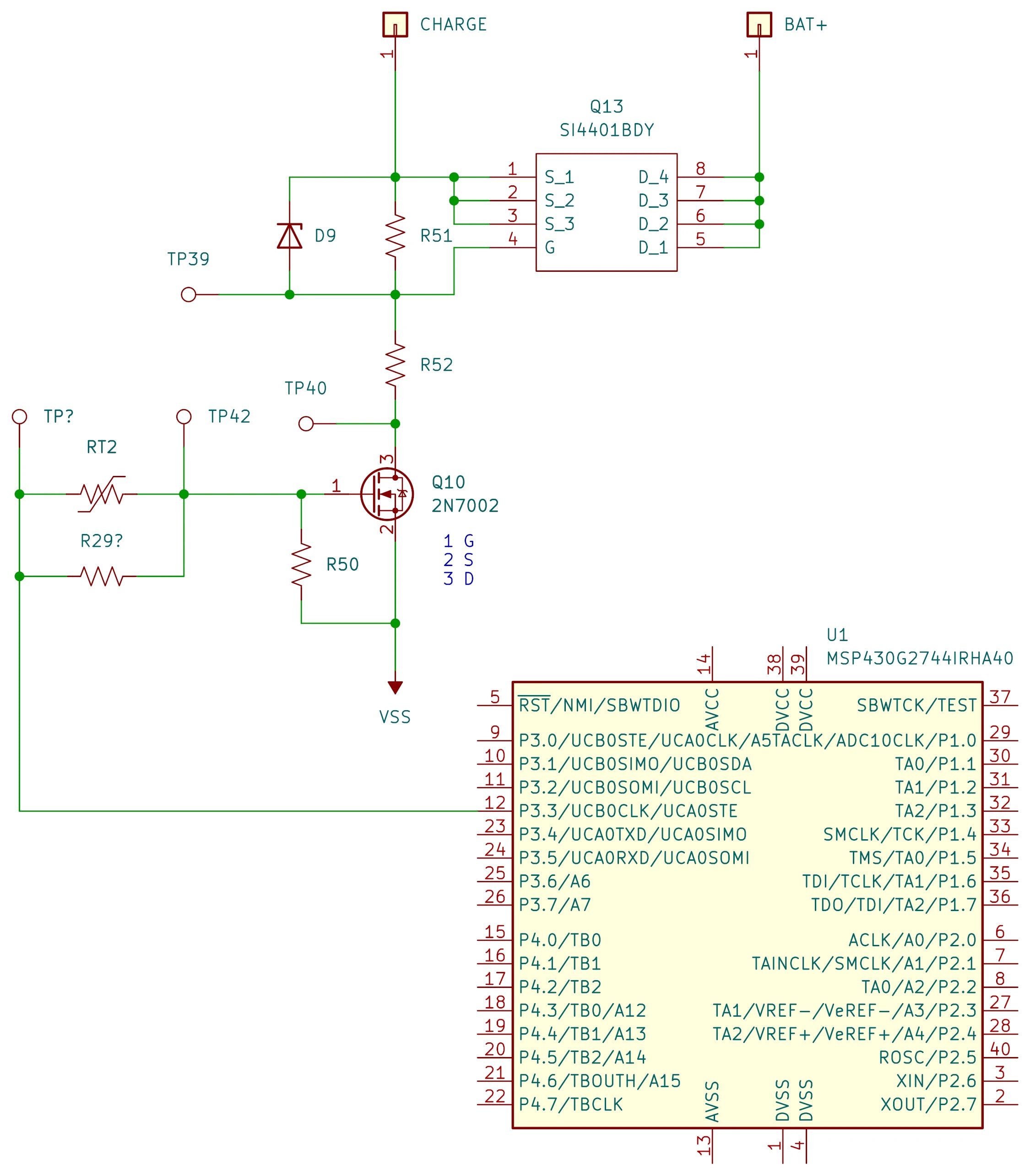
2023-01-28: Small update: Quick diagram of the charging control circuit. I needed to know which pin on the MSP430 controlled the charging circuit. Now you know too! Datasheet for 4401 P-Channel MOSFET (Datasheet, PDF, 8 pages, 181KB). Just as a reminder, RT2 is not populated and R29 is populated. (somehow I mis-labeled this resister on my BOM and the other board I have doesn't have RT2 or R29 on it... I need to dissect a couple more batteries to find a similar circuit board of similar vintage.) Now, I'm wondering how the battery knows a charger is connected...
And here are the UI circuit elements. It surprised me that they are using Q1 to turn the LEDs on and off; why would you use an extra IO Pin to cut power to LEDs? Would there be a leakage/voltage problem I'm missing? Switch input is nicely de-bounced in hardware, although there again I'm confused by the extra IO pin connected via R27... It seems wasted somehow; wouldn't a typical circuit use R27 to bias pin 33 towards VCC instead of connecting to an IO pin? There are direct connections from the 4 pin header to Pin 5 (Manual says 'Reset or nonmaskable interrupt input. Spy-Bi-Wire test data input/output during programming and test.') and Pin 37 (Manual says 'Selects test mode for JTAG pins on Port 1. The device protection fuse is connected to TEST. Spy-Bi-Wire test clock input during programming and test.') I really don't like seeing direct mentions about 'device protection fuses' on pin descriptions when I'd like to retrieve firmware at some point.

2023-02-03: Oh look! A handy guide from Texas Instruments on how to use the BQ76925 with the MSP430G2xx2. (PDF, 29 Pages, 941kB) Why do the circuit diagrams look familiar? It is almost like Milwaukee used a Texas Instruments reference design with tweaks!
2023-02-04: A couple interesting google patent links for M18 Batteries:
BATTERY PACK INCLUDING AN ELECTRIC HARNESS AND METHOD OF MANUFACTURING THE SAME (PDF, 11 pages, 770KB).
SYSTEM AND METHOD FOR CHARGING A BATTERY PACK (PDF, 9 pages, 1MB).
HIGH - POWER CORDLESS , HAND - HELD POWER TOOL INCLUDING A BRUSHLESS DIRECT CURRENT MOTOR (PDF, 72 pages, 5.8MB).
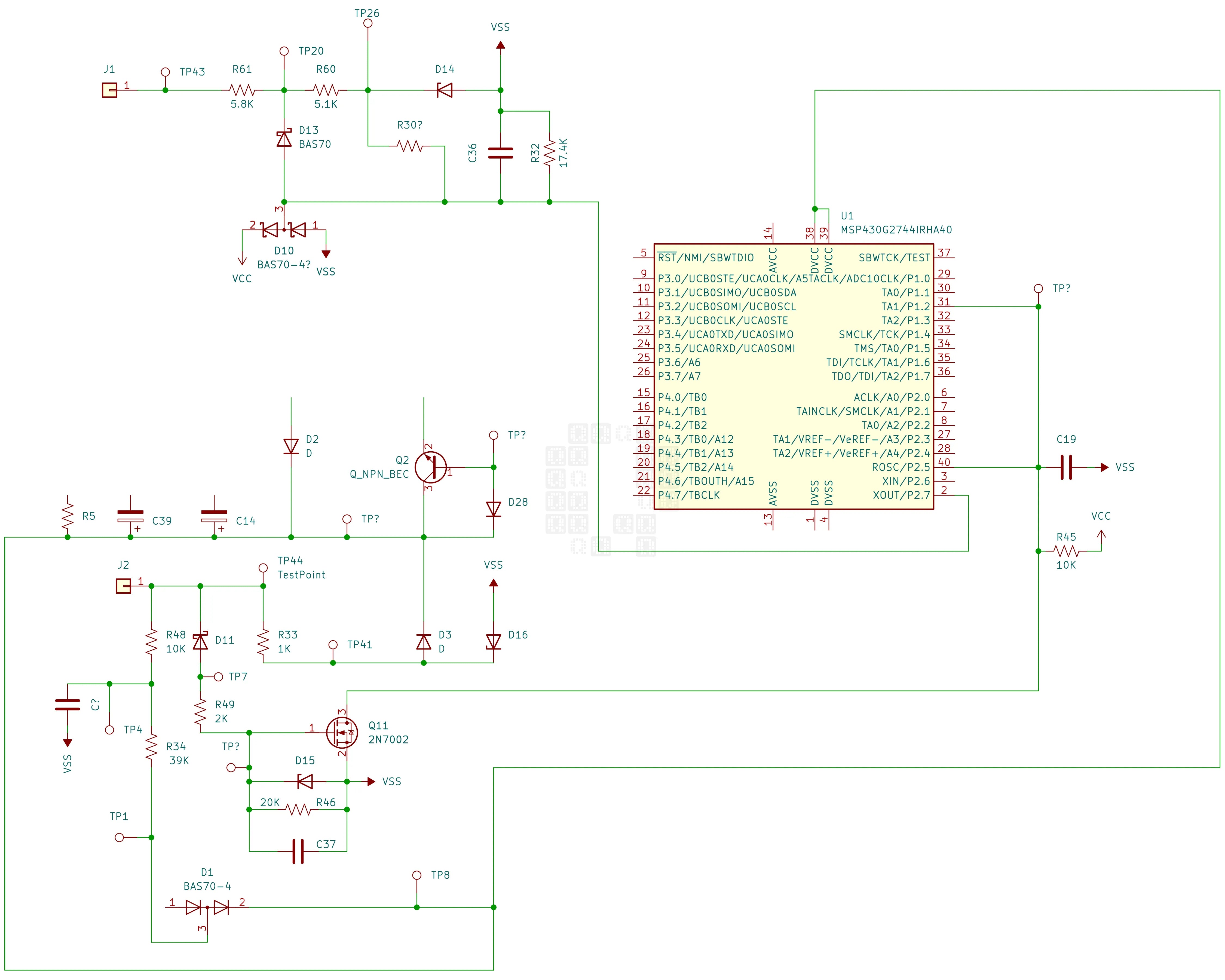
I'll add this diagram to the page as well, since J1/J2 communication seems to be a popular request and that I think I finally have it decently diagramed. J2 seems to have a dual purpose;
1) The Battery receives about 12VDC when connected to a charger (possibly also a tool?) This passes through R33 and 'wakes up' the MSP430 (assuming it is not already running). Battery then appears to pull voltage down [on J1], which signals to the charger that a battery has been connected and allowing communication to start.
2) Communication appears to pass through D11 -> Q11. MSP430 Communication Pins 40 and 31 are pulled high by Resistor R45 and pulled low by Q11.
3) I'm unsure what purpose the R48 connections serve at this point.

And one more diagram... This diagram shows the various signal wires and communication links between the MSP430 and the BQ76925. Finally have the Thermistors fit into the circuit as well!
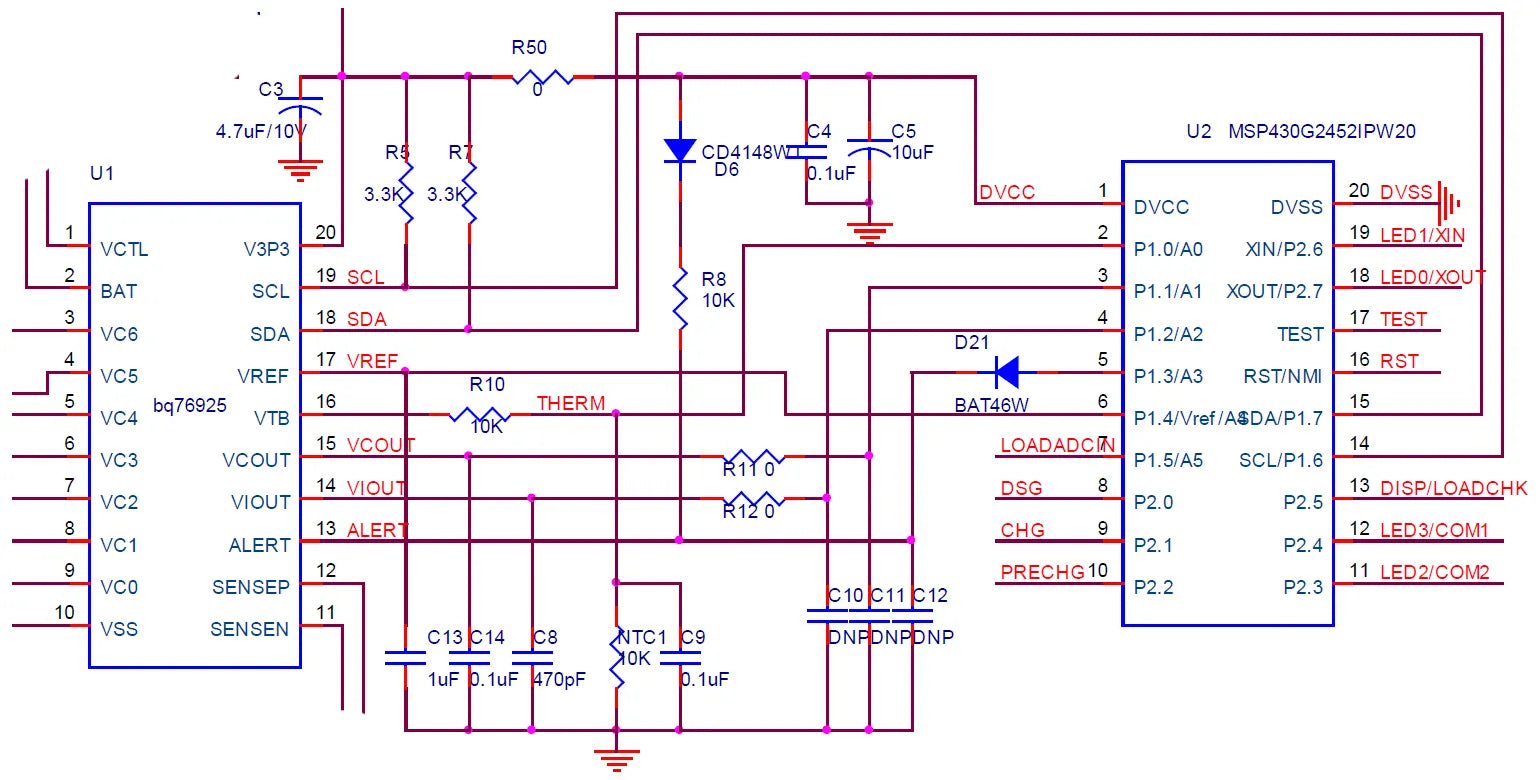
Its almost funny seeing that Milwaukee's battery uses an almost exact copy of this reference diagram from Texas Instruments' Application Report. (PDF, 29 Pages, 941kB) Only thing different I can see is the alert line which is unused by Milwaukee... Wonder why? (I didn't dive into the details on this pin yet...) I guess you can't improve on something that is perfectly designed!
2023-02-06: Milwaukee M18 Battery Communication:
Thanks to Mick @ buyitfixit for reminding me that when you measure a bit duration of 500us and calculate a baud rate of 2000 you probably shouldn't try to decode a serial stream with 1200 or 2400 baud no matter the what the datasheets say (or what common baud rates are).
Last byte of each message appear to be a Checksum. IE 0x81 + 0x20 + 0x00 + 0x00 = 0xA1 (Thanks again to Mick @ buyitfixit)
Battery does not appear to send any data on P1/P2 when battery test button is pushed; also doesn't appear like Milwaukee M18 Batteries support the long-press self-test diagnostic/LED flash codes anymore. Can't get them to appear on any battery year 2015+... [edit: Newer M18 FORGE batteries appear to have the functionality built in again]
There are a surprising number of M18 tools that don't seem to communicate with the battery... Course I'm dealing with mostly used/otherwise broken tools, so there is a possibility that there is something faulty there as well. M18 LED Flashlight, transfer pump, circular saw etc don't seem to communicate.
2023-02-11 Update: Below is some data for anybody to pour over. Still not quite sure on bit order - scope is set for LSB (Least Significant Bit). First spreadsheet is the results of a 7 second capture on my scope, triggered by the communication line dropping in voltage when the battery gets plugged into the charger. Charger begins communication with an 0x55 handshake (Charger is RX and Battery is TX). Various data points about the batteries are included in the spreadsheet. Strangely, a lot of it looks very similar with the only major difference being an early shutdown in communication when the battery reports itself as already full. First byte might be a device ID. Second byte may be a command. Last byte is a checksum. In between?
BatteryPluggedIntoCharger (ZIP - Libreoffice Calc Spreadsheet .ODS, 33KB)
2nd/3rd Spreadsheet: I also tapped the SDA/SCL Communication lines between the BQ76925 and R7F0C901B2 MCU in addition to watching the P1/P2 Data lines. Unfortunately, my scope has a very limited capture time due to four channels and the increased resolution required for the I2C communication. This shows the data that is being requested by the R7F0C901B2 MCU, but not the actual data supplied by the BQ76925. I've included a couple pictures on the spreadsheet of register maps on the BQ76925 to help decode the data... Strangely, at least to me, VC4_CAL isn't requested and I only see requests for one battery cell voltage. (please correct me if I'm mis-interpreting data wrong)
2023-02-10_Charging (ZIP - Libreoffice Calc Spreadsheet .ODS, 147KB)
SDA_SCL_Decode (ZIP - Libreoffice Calc Spreadsheet .ODS, 148KB)
2023-09-12: Update: I have no affiliation with Tool Scientist, but he's taken the reverse engineering further than I had time to...
2023-10-29: New video from Tool Scientist explaining 'Tool to Battery Communication':
Definitely glad to know I wasn't crazy or being downright stupid in not finding any communication happening between the tool and battery, though I'll have to confess I did miss the 12V/3V 'handshake' - I saw that the voltages were there, but never saw the handshake or saw them drop out. That and the complete miss on the battery amperage monitoring even though I clearly saw that it was supposed to be there on the sample designs. I just assumed Milwaukee chose to not implement it. Excellent work by the tool scientist... Now on to some new circuit designs!
2024-09-14: Update: No new information, but happy to see a mention! (and yes I really didn't see this for 11 months!)
2024-10-5: Another video from Tool Scientist. He explains things so much better than I can! Seems there is one small step yet until someone builds a 3rd party external balancer for these batteries. (PLEASE, if someone has done so, please let me know! I'll gladly build and test units if needed!) I've done manual balancing on 100's of these batteries to get them working again! And what was he working on that he created code to generate a balance byte? :) I guess we'll find out in future videos!
Also realized I never linked to the other partially finished, related pages to this project. For more information on the Rapid Charger internals, CLICK HERE. For a similar (but not the same) partially completed teardown of a 5Ah battery, CLICK HERE. (the reference in the video above about the Renesas R7F0C901B2 microprocessor is what made me check for the links that I apparently never put up on this page.)
(Also made a couple readability fixes for this page.)
2024-12-28: Bunny Trail on obsolete MSP430 chips (click to expand)
2024-12-28: After watching some of the latest Tool Scientist videos, I have to add a note: Has anyone considered the Texas Instruments BQ76925EVM Evaluation Module? Scroll down the page a little to where it says 'SLUC581 — bq76925 Example Code' Under technical docs, there is a Datasheet and a User's Guide (SLUU514A). There is also an Application Report (SLUA707) which gives a hint at a prebuilt battery management codebase from TI... which I can't seem to find...
2025-01-07: Theoretical only; read and apply at your own risk!
Processor above is 40-Pin RHA package (Source: MSP430G2744 Datasheet (Datasheet, PDF, 86 pages, 2.15MB)., pages 5 & 8

and this part can possibly be programmed by the MSP-FET430UIF programming tool while possibly using the MSP-TS430RGA40A socket. MSP430 Hardware Tools (PDF, 191 pages, 9.75MB). pages 78-80 gives a Schematic, layout and BOM for the board.

(There is also MSP430G2xx Family User's Guide (PDF, 703 pages, 9.49MB). that gives you quite a lot of info about the processor and all its functions, including an interesting section 7 on Flash Memory Operation.)
of related interest would probably be the MSP430 Programming with the JTAG Interface User's Guide (PDF, 83 pages, 1.68MB). and the MSP430 Flash Devices Bootloader BSL (PDF, 52 pages, 1.13MB). There are two warnings, one in each document: 1): Each MSP430F1xx, 2xx, and 4xx flash device includes a physical fuse that is used to permanently disable memory access through JTAG communication. When this fuse is programmed (or blown), access to memory through JTAG is permanently disabled and cannot be restored. 2) Access to the MSP430 MCU memory through the BSL is protected against misuse by the BSL password.
Anyway, bunny trail... back to the MSP430 Hardware Tools (PDF, 191 pages, 9.75MB). Pages 21 and 22 show two connection diagrams for programming.

RST/NMI is Pin 5
TDO/TDI is Pin 36
TDI/VPP is 35?
TMS is Pin 34
TCK is Pin 33
TEST is Pin 37

RST/NMI/SBWTDIO is Pin 5
TEST/SBWTCK is Pin 37
and now we need to revisit an earlier electrical diagram with a header labeled HD1 - We can now clearly identify it as a Spy-bi-Wire /2-Wire JTAG interface. R1 and C1-C3 [in above diagram] are on the battery circuit board.
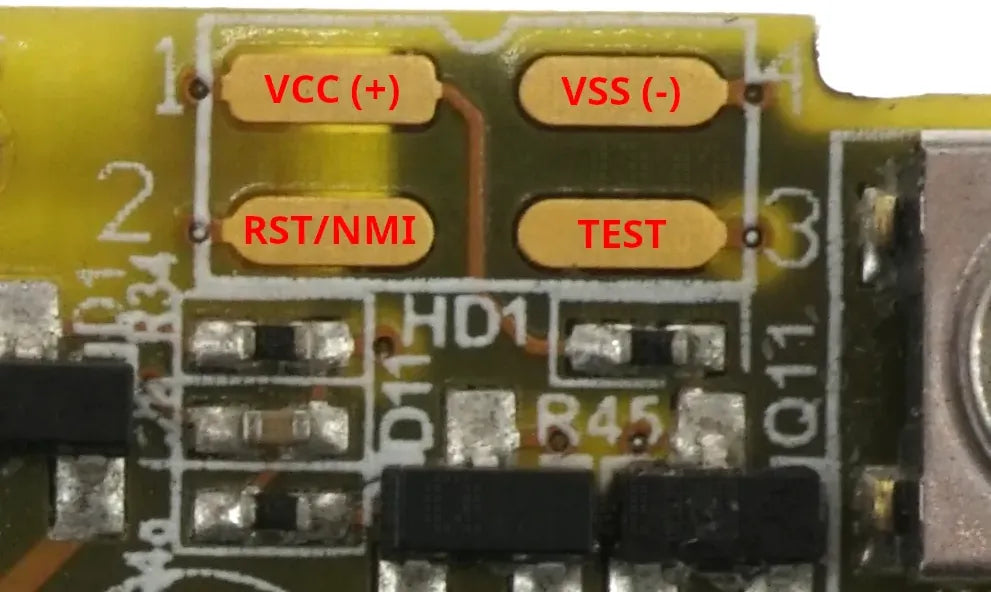
This should be an basic schematic of all the pins on the M18 Battery / MSP430 chip related to JTAG and Programming. Most of the pins have a testpoint that could be soldered to except pin 36 which seems to go to a via which has no further connections...

(also a fix for a misplaced div tag in html page code... now paragraphs don't run to the very edge of the page and are a little more readable.)
2025-01-11: Theories don't always work out so well in practice... Waiting on a MSP-TS430QFN40 yet... I think something is happening though; as soon as I attempt communication, battery refuses to respond to the pushbutton on the board and can only be woken up again by connecting to a charger. 3.3VDC still present across VCC / VSS
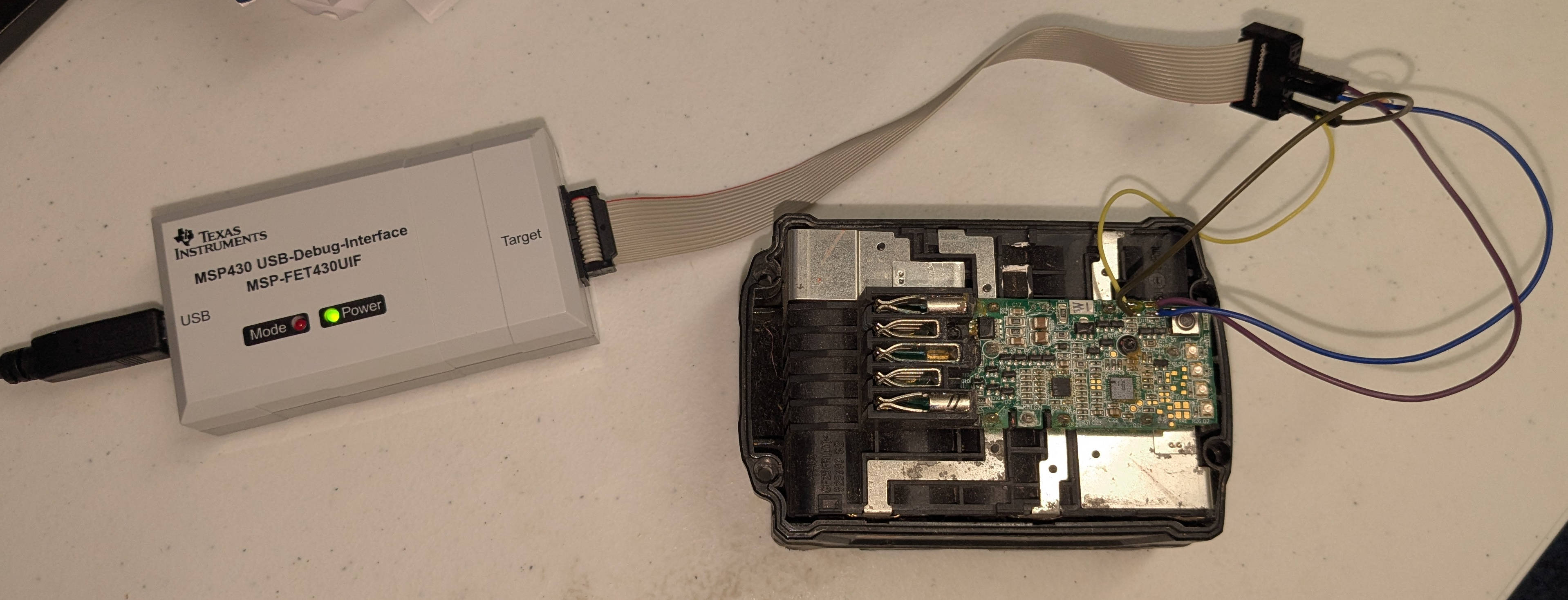
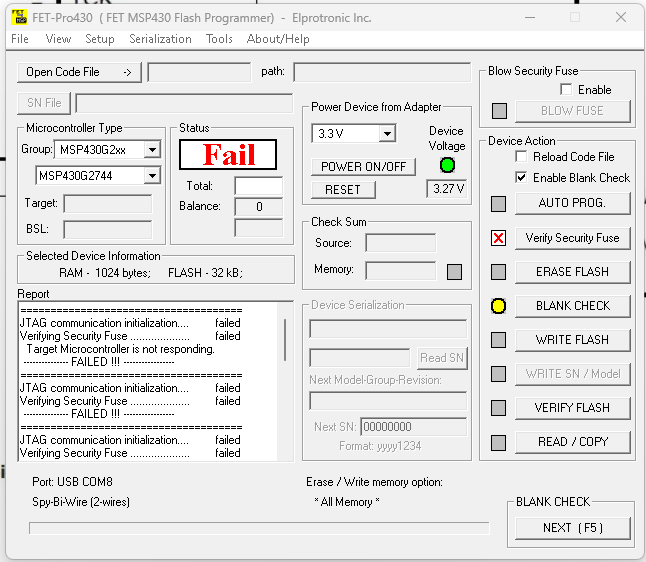
2025-01-15: MSP-TS430QFN40 arrived... De-soldered 4 chips... and attempted to plunk the first into the socket... it did not plunk into place, but fell between the contacts... ? Chip measures 5x5mm - RHA40 should be about 5.8x5.8mm or QFN40 about 6x6mm... After some careful squinting I can see that this is an 32pin Renesas R5F100BG. I can see that the other chips I removed are also labeled the same way... These batteries were all 2018 and newer... I knew that there were newer chips in use, but it never registered in my brain to check if I had any of the old batteries with the MSP430. Sigh. Time to reconnoiter...

2025-04-14: Ahem... I really should [try to] keep up with other people. I still haven't found any old batteries with the MSP430 microcontroller to use and someone else has gone ahead and done all the work for me:
Link to Chinese M18 Battery Circuit Boards
2025-04-14: Link to M18 Rapid Charger Reverse Engineering [work in progress] Hint: there is a programming header for the R5F100!
Corrections are welcome... Please let me know if you see mistakes!
And as always, clicking on an image will give you a higher-res version! If you repost or further dissect this board, please link back to the original and let us know where we can read about your work!
1 comment
2023-02-10_Charging (ZIP – Libreoffice Calc Spreadsheet .ODS, 147KB) link is dead.
Link to Chinese M18 Battery Circuit Boards link is dead.